
Roleplay & Utilities
Notifications for RedM
One black and gold notification box for RedM, so every message looks the same and players always know what to expect. Each player can move it where they like. Works on any framework.
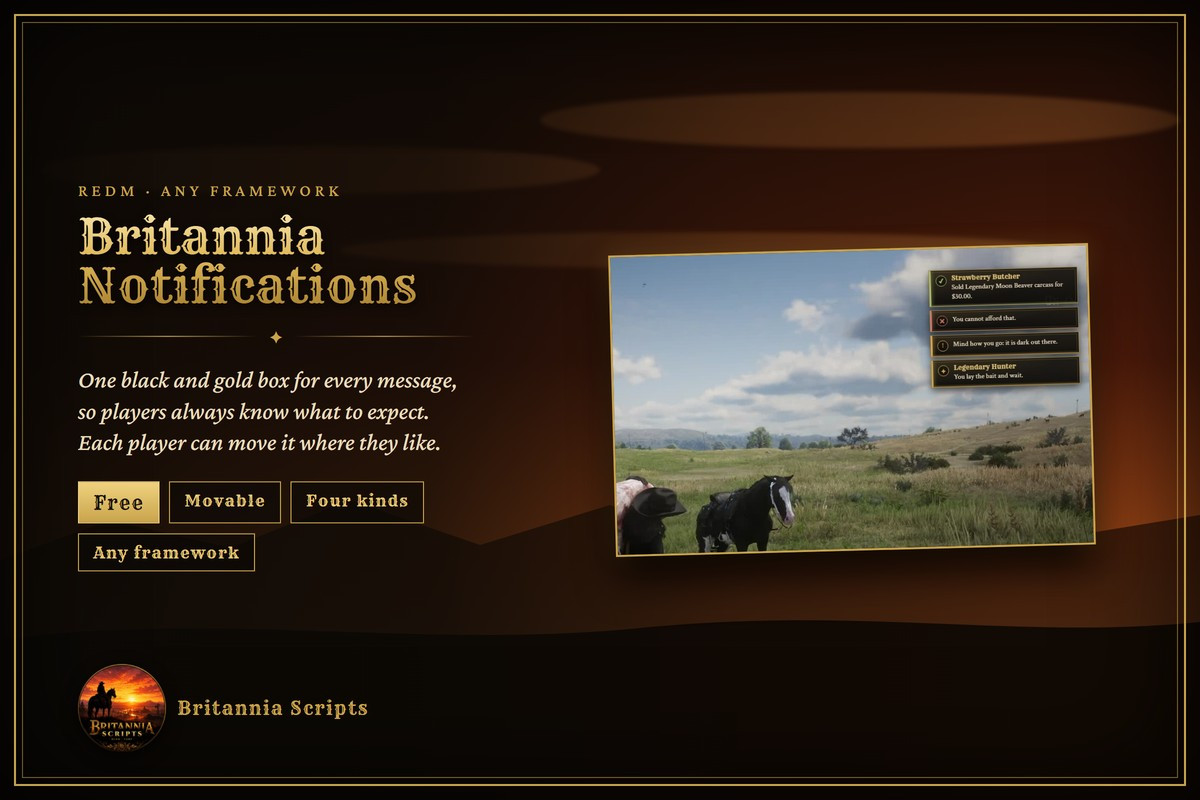
At a glance
- Any framework: VORP, RSG, QBCore RedM or anything else
- One black and gold box for every message
- Four kinds: info, success, warning and error, with an optional title
- Repeats count up instead of piling up
- Every player can move it with /notifications
- Britannia scripts use it automatically (from their next updates)
- One export or event for your own scripts
- English, Spanish and French
- Free, source included
One black and gold notification box for your RedM server, so every message looks the same and players always know what to expect. Each player can move it where they like.
Works on any framework: VORP, RSG Core, QBCore RedM or anything else. No dependencies.
What players get
- One style for every message: a dark panel with a thin gold frame, top right by default.
- Four kinds: info, success, warning and error, each with its own colour and mark, and an optional title.
- Tidy: messages stack newest on top, the same message again counts up (×2, ×3) instead of piling up, and a thin line runs down until each one leaves.
- Movable: /notifications dims the screen and shows sample messages to drag where you like. Your spot is remembered.
For server owners
- Britannia scripts use it automatically from their next updates (their Config.Notify setting), and fall back to poggy_core's notifications when it isn't running.
- Use it from your own scripts: one export on the client or the server, or an event.
- Starting spot, how long messages stay, how many show at once, width, colours, an optional sound and the command names, all in the config.
- English, Spanish and French.
- Free: plain source, yours to use and change on your servers. Please don't sell or re-upload it.
Delivery
Download Britannia_Notifications.zip after checkout. The setup guide is at playbritannia.co/docs/notifications. Support is on our Discord: discord.gg/aSFCvzRG3M