
Overview
Halloween is a ready-made event for your server. Players hunt for pumpkins and ghosts across the map, perform rituals at witchcraft circles, explore a haunted house and fight off monsters at night. A Halloween trader hands out the big rewards. The event stops by itself after the end date you set.
- Pumpkin hunt (30 spots) and ghost hunt (20 spots), placed for you on the first start.
- Spooky sounds near unfound pumpkins and ghosts, louder as players get closer.
- Haunted spots with whispers and see-through figures.
- Witchcraft circles: rituals with a blessing, a curse, an apparition or a monster attack.
- A ritual quest: find items around the map and a zombie bodyguard rises to guard you.
- A haunted house with jumpscares, ghosts and the cursed doll.
- A Halloween trader who rewards finished hunts and the cursed doll.
- Random monster visits and random jumpscares at night.
- Staff tools to place, remove and check hunt spots in game.
Requirements
- poggy_core (free), version 0.14.0 or newer.
- oxmysql.
- One of VORP, RSG Core or QBCore RedM (poggy_core connects the script to it).
- Optional:
btc-playerskills, for "Monster Hunter" XP.
Install
- Download
Britannia_Halloweenfrom portal.cfx.re → Assets → Granted Assets. - Put the
Britannia_Halloweenfolder in your server'sresourcesfolder. - Add the items (see Items below):
- VORP: run
SQL.sqlonce in your database, and copyinstallation/images/*.pngintovorp_inventory/html/img/items/. - RSG Core / QBCore RedM: copy the entries from
installation/items_rsg_qbcore.txtinto your shared items list, and the pictures into your inventory's image folder.
- VORP: run
- Add
ensure Britannia_Halloweentoserver.cfg, afterensure poggy_core. - Restart the server.
- Set the end date, prizes, haunted house, trader and anything else in
shared/config.lua.
installation/install.html has the same steps, the item pictures and the SQL, ready to open in your browser.
The script creates its own tables on start (britannia_halloween_spots, britannia_halloween_found and britannia_halloween_bonus). sql/install.sql is there for reference only. On the first start, 30 pumpkin and 20 ghost spots are placed around the map: churches, cemeteries, caves, farms, camps and so on.
Items
| Picture | Item | Label | Used for |
|---|---|---|---|
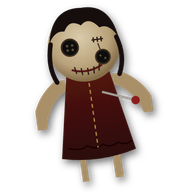 | cursed_doll | Cursed Doll | Taken from the haunted house. Usable: listen to it, or curse a player close by. Can be handed in to the trader. |
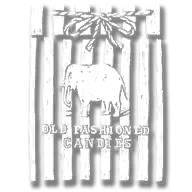 | consumable_candy_bag | Candy Bag | Pumpkin hunt prize |
 | consumable_apple_candy | Apple Candy | Ghost hunt prize |
VORP. Run this once in your database. It is safe to run more than once: INSERT IGNORE leaves any item you already have exactly as it is.
INSERT IGNORE INTO `items` (`item`, `label`, `limit`, `can_remove`, `type`, `usable`) VALUES
	-- The cursed doll from the haunted house (one per character). Usable: listen to it,
	-- or curse a player standing close. It can be handed in to the Halloween trader.
	('cursed_doll',            'Cursed Doll', 1,  1, 'item_standard', 1),
	-- Prizes from the pumpkin and ghost hunts (Config.Hunts -> Prizes)
	('consumable_candy_bag',   'Candy Bag',   10, 1, 'item_standard', 1),
	('consumable_apple_candy', 'Apple Candy', 10, 1, 'item_standard', 1);
RSG Core / QBCore RedM. Add the items to your shared items list instead (RSG Core: rsg-core/shared/items.lua; QBCore RedM: qbr-core/shared/items.lua, inside QBShared.Items), and copy the pictures into your inventory's image folder (rsg-inventory/html/images/ or qbr-inventory/html/images/). The entries are in installation/items_rsg_qbcore.txt:
-- RSG Core
cursed_doll            = { name = 'cursed_doll',            label = 'Cursed Doll', weight = 200, type = 'item', image = 'cursed_doll.png',            unique = true,  useable = true, shouldClose = true, description = 'A doll from the haunted house. Listen to it... or curse someone close.' },
consumable_candy_bag   = { name = 'consumable_candy_bag',   label = 'Candy Bag',   weight = 100, type = 'item', image = 'consumable_candy_bag.png',   unique = false, useable = true, shouldClose = true, description = 'A Halloween treat.' },
consumable_apple_candy = { name = 'consumable_apple_candy', label = 'Apple Candy', weight = 100, type = 'item', image = 'consumable_apple_candy.png', unique = false, useable = true, shouldClose = true, description = 'A Halloween treat.' },

-- QBCore RedM
['cursed_doll']            = { ['name'] = 'cursed_doll',            ['label'] = 'Cursed Doll', ['weight'] = 200, ['type'] = 'item', ['image'] = 'cursed_doll.png',            ['unique'] = true,  ['useable'] = true, ['shouldClose'] = true, ['combinable'] = nil, ['description'] = 'A doll from the haunted house. Listen to it... or curse someone close.' },
['consumable_candy_bag']   = { ['name'] = 'consumable_candy_bag',   ['label'] = 'Candy Bag',   ['weight'] = 100, ['type'] = 'item', ['image'] = 'consumable_candy_bag.png',   ['unique'] = false, ['useable'] = true, ['shouldClose'] = true, ['combinable'] = nil, ['description'] = 'A Halloween treat.' },
['consumable_apple_candy'] = { ['name'] = 'consumable_apple_candy', ['label'] = 'Apple Candy', ['weight'] = 100, ['type'] = 'item', ['image'] = 'consumable_apple_candy.png', ['unique'] = false, ['useable'] = true, ['shouldClose'] = true, ['combinable'] = nil, ['description'] = 'A Halloween treat.' },
If you rename an item in shared/config.lua, rename it in your items list too.
Configuration
The script is encrypted with Cfx.re asset escrow. shared/config.lua stays editable, and every option in it is commented.
| Setting | What it does | Default |
|---|---|---|
Config.Event.Enabled | Master switch. false turns everything Halloween off | true |
Config.Event.EndsOn | Last day of the event (server time), 'YYYY-MM-DD'. Everything stops at midnight at the end of this day | '2026-11-01' |
Config.Commands.Progress | Command for the player's progress | 'halloween' |
Config.Commands.Admin | Command for the staff tools | 'halloweenadmin' |
Config.AdminAce | Ace that gives access to the staff tools (poggy_core admins have it too) | 'britannia_halloween.admin' |
Config.Hunts | The pumpkin and ghost hunts: models, spawn and find distances, prompt key (E), XP and weighted Prizes (cash, gold or items) | pumpkin and ghost |
Config.Xp | Monster Hunter XP through btc-playerskills. Enabled = false turns it off | Enabled = true, MaxLevel = 20 |
Config.Sounds | Sounds near unfound spots: Distance, Volume, MaxLoops | 25.0, 0.6, 2 |
Config.Haunts | Haunted spots: Enabled, Radius and the list of Spots | 8 spots, 35 m |
Config.Circles | Witchcraft circles: CooldownMinutes between rituals, the weighted Outcomes and the Spots | 5 circles, 30 minutes |
Config.Quest | The ritual quest: ItemsToFind, AreaRadius shown on the map, the Bodyguard (minutes, health, weapon) and the item Spots | 5 items, 30-minute bodyguard |
Config.HauntedHouse | Position, Radius, scare timing, Jumpscare chance and the cursed doll (Relic) | Enabled = true |
Config.Doll | The cursed doll: CurseDistance, CurseSeconds, CooldownMinutes | 4.0, 20, 10 |
Config.Trader | The trader's model, position (x, y, z, h) and Rewards for every pumpkin, every ghost and the doll | Valentine church; 5, 8 and 10 gold |
Config.Attacks.Types | The monsters (zombie, witch, vampire): models, health, speed, weapon, XP and prizes | 3 types |
Config.Attacks.Random | Random night visits: how often, the player cooldown, NightOnly, the town SafeZones and the weighted Options | every 15 to 30 minutes |
Config.RandomJumpscares | Random jumpscares: how often, NightOnly, and InTowns | every 10 to 25 minutes |
Config.Night | Optional orange night tint. StartHour and EndHour also set "night" for the random visits and jumpscares | Enabled = false, 20 to 5 |
Config.Notify.Duration | How long notifications stay on screen, in milliseconds | 5000 |
For example, to run the event again next year, change the end date:
Config.Event = {
    Enabled = true,
    EndsOn = '2027-11-01',
}
Commands and permissions
"Staff" means players with the ace britannia_halloween.admin, or poggy_core admins.
| Command / key | Who | What it does |
|---|---|---|
/halloween | Everyone | Shows your progress: pumpkins and ghosts found out of the total, the cursed doll and the ritual |
E | Everyone | Takes a pumpkin, catches a ghost, starts a ritual, takes the doll, talks to the trader |
/halloweenadmin | Staff | Opens the staff menu: place spots, remove the nearest, find spots inside buildings, and test tools (reset your ritual or doll, fill quest items, a jumpscare, a random visit, a bodyguard) |
/halloweenadmin place pumpkin / place ghost | Staff | Adds a spot where you stand |
/halloweenadmin remove | Staff | Removes the nearest spot (within 5 m) |
/halloweenadmin count | Staff | Shows how many spots each hunt has |
/halloweentint <0-1> / off / auto | Staff | Tries the night tint on your own screen only |
Give the ace in server.cfg, for example:
add_ace group.moderator britannia_halloween.admin allowHow it works
Hunts. Pumpkins and ghosts appear only near each player, on their own screen. Each character can find each spot once, and every find gives a prize rolled from that hunt's Prizes. If the player has no room for an item prize, they get a little cash instead. Found spots disappear for that player. The server checks every find: the event is on, the spot is real, the player is close enough and it hasn't been found before.
The trader. Once a player has found every pumpkin, or every ghost, they claim a reward from the Halloween trader. Handing in the cursed doll gives a reward too (the doll is taken). Each reward can be claimed once per character.
Haunted spots. Near these places players hear whispers and now and then see a see-through figure.
Witchcraft circles. Performing a ritual gives one outcome, rolled on the server: a blessing (cash or gold), a curse (a screen effect for a while), an apparition, or a summoning, where ghosts wander and then monsters attack. There is a cooldown between rituals.
The ritual quest. At a circle a player begins the ritual and is given items to find. The map shows a circle around roughly where each one is. Bringing them all back to the same circle completes the ritual, and a zombie rises to guard the player for a while. Once per character per day.
The haunted house. Inside, players get scares and jumpscares, and meet ghosts that vanish with a whisper when approached. The cursed doll can be taken once per character. Used alone, it whispers and a figure appears behind you. Next to another player, you can curse them.
Monsters. Zombies, witches and vampires are real game characters that everyone nearby sees and can fight. Every kill is checked on the server and can give XP and a prize. They give up and vanish if players get far enough away.
Random visits and jumpscares. Now and then, a player out in the wilds at night gets a visit (a ghostly scare, zombies, a witch or the vampire), or a jumpscare out of nowhere. Random visits never happen inside the town safe zones and give no rewards.
XP. With btc-playerskills running, finds and kills add XP to a "Monster Hunter" perk. The perk is created the first time.
The end. Everything stops by itself after Config.Event.EndsOn.
Troubleshooting
Nothing Halloween happens, and /halloween says the event is over
Check Config.Event.Enabled is true and that Config.Event.EndsOn hasn't passed. The default end date is 2026-11-01: change it for a new year.
Players get cash instead of candy
That happens when the item can't be given: the player has no room, or the item is missing from your items list. Add the items (see Items) and restart the server.
The cursed doll can't be taken, or does nothing when used
The cursed_doll item must exist in your items list and be usable. The doll can be taken once per character, and players need room in their satchel for it.
"You are not allowed to do that." on /halloweenadmin
Give the player the ace britannia_halloween.admin, or make them a poggy_core admin.
Some pumpkins or ghosts can't be seen
A spot inside a building is hidden from players. Open /halloweenadmin, pick Check for spots inside buildings, go to each one, remove it and place a new one outside.
No Monster Hunter XP
XP needs btc-playerskills started, and Config.Xp.Enabled = true. Without it, everything else still works.
The script won't start, or warns about poggy_core
Halloween needs poggy_core 0.14.0 or newer, and oxmysql. Make sure both start before Britannia_Halloween in server.cfg.
Version history
- 1.0.1: fixes how the monsters and the ritual bodyguard are set up once a player has spawned.
- 1.0.0: first public release.
Still stuck?
Open a ticket on our Discord with your framework, your poggy_core version and what you see, and we'll help you get it running.
Get help on Discord