
Overview
Beekeeper lets players build and run their own apiary. They place a hive box, add a queen and bees, then look after the colony so it produces honey, honeycomb, beeswax or hornet poison. Wild hives around the map can be smoked and raided for new bees, queens and honey. Beekeeper is free and open source (GPL 3.0). It is based on mms-beekeeper by RetryR1v2, with hive props from RMS-dnb's RSG Beekeeper.
- Six hive boxes, each with its own model.
- Six kinds of colony (four bees, two hornets), each with its own product.
- A hive panel with food, water, cleanliness, health, sickness and the jars ready to take.
- Happy colonies make more and grow. Neglected colonies lose bees, and can fall sick.
- Hire another player as a helper for a hive.
- Wild hives to smoke and raid, which reset after a while.
- Map blips on your own hives.
Requirements
- poggy_core (free), version 0.14.0 or newer.
- oxmysql.
- One of VORP, RSG Core or QBCore RedM (poggy_core connects the script to it).
Install
- Download
Britannia_beekeeperfree from playbritannia.co. - Put the
Britannia_beekeeperfolder in your server'sresourcesfolder. - Copy every picture from
installation/images/into your inventory's item image folder (VORP:vorp_inventory/html/img/items/). Don't rename them: the file name must match the item name. - VORP: run
SQL.sqlin your database (HeidiSQL, phpMyAdmin and so on). It adds every item the script needs. It's safe to run more than once, and items your server already has are left unchanged. RSG Core / QBCore RedM: add the same items to your shared items list (see Items). - Add
ensure Britannia_beekeepertoserver.cfg, afterensure oxmysqlandensure poggy_core. - Restart the server.
The hive table mms_beekeeper is created automatically on every framework.
You can also open installation/install.html in your browser. It shows every item with its picture, has a download button for each image, and includes the SQL with a copy button.
Items
| Picture | Item | Label | Used for |
|---|---|---|---|
 | beehive_box | Pioneer Hive | Usable: places a hive |
 | beehive_box2 | Meadow Hive | Usable: places a hive |
 | beehive_box3 | Golden Hive | Usable: places a hive |
 | beehive_box4 | River Hive | Usable: places a hive |
 | beehive_box5 | Alpine Hive | Usable: places a hive |
 | beehive_box6 | Frontier Hive | Usable: places a hive |
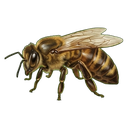 | basic_queen | Basic Queen Bee | Starts a honey colony |
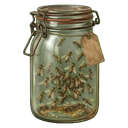 | basic_bees | Basic Bees | Added to a honey colony |
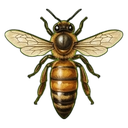 | wild_queen | Wild Queen Bee | Starts a wild honey colony |
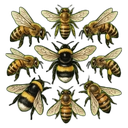 | wild_bees | Wild Bees | Added to a wild honey colony |
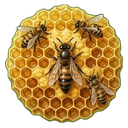 | honeycomb_queen | Honeycomb Queen Bee | Starts a honeycomb colony |
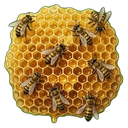 | honeycomb_bees | Honeycomb Bees | Added to a honeycomb colony |
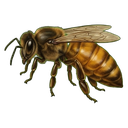 | beeswax_queen | Beeswax Queen Bee | Starts a beeswax colony |
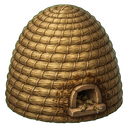 | beeswax_bees | Beeswax Bees | Added to a beeswax colony |
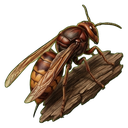 | basic_hornet_queen | Basic Hornet Queen | Starts a hornet colony |
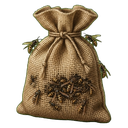 | basic_hornets | Basic Hornets | Added to a hornet colony |
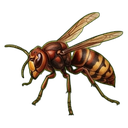 | mexican_hornet_queen | Mexican Hornet Queen | Starts a Mexican hornet colony |
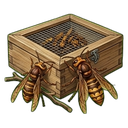 | mexican_hornets | Mexican Hornets | Added to a Mexican hornet colony |
 | honey | Honey | Product of basic bees |
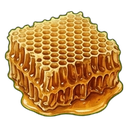 | wildhoney | Wild Honey | Product of wild bees |
 | honeycomb | Honeycomb | Product of honeycomb bees |
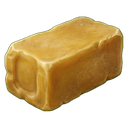 | beeswax | Beeswax | Product of beeswax bees |
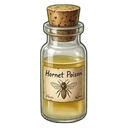 | hornet_poison_basic | Hornet Poison | Product of basic hornets |
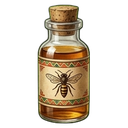 | hornet_poison_mexican | Mexican Hornet Poison | Product of Mexican hornets |
 | empty_bee_jar | Empty Glass Jar | Holds each harvest, and bees or queens caught in the wild |
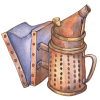 | torch_smoker | Smoker | Calms a wild hive |
 | bug_net | Bug Net | Catches bees and queens from wild hives |
 | sugar | Sugar | Feeds a hive |
 | water | Water | Waters a hive |
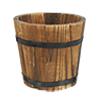 | bucket | Bucket | Given back after watering |
 | bee_cleaner | Bee Cleaner | Cleans a hive |
 | bee_health | Bee Health | Heals a hive |
 | bandage | Bandage | Cures a sick colony |
VORP SQL (the same as SQL.sql):
CREATE TABLE IF NOT EXISTS `mms_beekeeper` (
	`id` INT(11) NOT NULL AUTO_INCREMENT,
	`ident` VARCHAR(50) NULL DEFAULT NULL COLLATE 'armscii8_general_ci',
	`charident` VARCHAR(50) NULL DEFAULT NULL,
	`data` LONGTEXT NULL DEFAULT '{}' COLLATE 'utf8mb3_general_ci',
	PRIMARY KEY (`id`) USING BTREE
)
COLLATE='armscii8_general_ci'
ENGINE=InnoDB
;

-- Beehive boxes (usable: placing one builds a hive)
INSERT IGNORE INTO `items` (`item`, `label`, `limit`, `can_remove`, `type`, `usable`) VALUES
('beehive_box',  'Pioneer Hive',  5, 1, 'item_standard', 1),
('beehive_box2', 'Meadow Hive',   5, 1, 'item_standard', 1),
('beehive_box3', 'Golden Hive',   5, 1, 'item_standard', 1),
('beehive_box4', 'River Hive',    5, 1, 'item_standard', 1),
('beehive_box5', 'Alpine Hive',   5, 1, 'item_standard', 1),
('beehive_box6', 'Frontier Hive', 5, 1, 'item_standard', 1);

-- Queens and bees
INSERT IGNORE INTO `items` (`item`, `label`, `limit`, `can_remove`, `type`, `usable`) VALUES
('basic_queen',          'Basic Queen Bee',      5,  1, 'item_standard', 0),
('basic_bees',           'Basic Bees',           20, 1, 'item_standard', 0),
('wild_queen',           'Wild Queen Bee',       5,  1, 'item_standard', 0),
('wild_bees',            'Wild Bees',            20, 1, 'item_standard', 0),
('honeycomb_queen',      'Honeycomb Queen Bee',  5,  1, 'item_standard', 0),
('honeycomb_bees',       'Honeycomb Bees',       20, 1, 'item_standard', 0),
('beeswax_queen',        'Beeswax Queen Bee',    5,  1, 'item_standard', 0),
('beeswax_bees',         'Beeswax Bees',         20, 1, 'item_standard', 0),
('basic_hornet_queen',   'Basic Hornet Queen',   5,  1, 'item_standard', 0),
('basic_hornets',        'Basic Hornets',        20, 1, 'item_standard', 0),
('mexican_hornet_queen', 'Mexican Hornet Queen', 5,  1, 'item_standard', 0),
('mexican_hornets',      'Mexican Hornets',      20, 1, 'item_standard', 0);

-- Products
INSERT IGNORE INTO `items` (`item`, `label`, `limit`, `can_remove`, `type`, `usable`) VALUES
('honey',                 'Honey',                 50, 1, 'item_standard', 0),
('wildhoney',             'Wild Honey',            50, 1, 'item_standard', 0),
('honeycomb',             'Honeycomb',             50, 1, 'item_standard', 0),
('beeswax',               'Beeswax',               50, 1, 'item_standard', 0),
('hornet_poison_basic',   'Hornet Poison',         50, 1, 'item_standard', 0),
('hornet_poison_mexican', 'Mexican Hornet Poison', 50, 1, 'item_standard', 0);

-- Jars and tools
INSERT IGNORE INTO `items` (`item`, `label`, `limit`, `can_remove`, `type`, `usable`) VALUES
('empty_bee_jar', 'Empty Glass Jar', 50, 1, 'item_standard', 0),
('torch_smoker',  'Smoker',          1,  1, 'item_standard', 0),
('bug_net',       'Bug Net',         1,  1, 'item_standard', 0);

-- Hive care items (INSERT IGNORE leaves ones you already have untouched)
INSERT IGNORE INTO `items` (`item`, `label`, `limit`, `can_remove`, `type`, `usable`) VALUES
('sugar',       'Sugar',        20, 1, 'item_standard', 0),
('water',       'Water',        10, 1, 'item_standard', 0),
('bucket',      'Bucket',       5,  1, 'item_standard', 0),
('bee_cleaner', 'Bee Cleaner',  20, 1, 'item_standard', 0),
('bee_health',  'Bee Health',   20, 1, 'item_standard', 0),
('bandage',     'Bandage',      10, 1, 'item_standard', 0);
Many servers already have sugar, water, bucket or bandage. The SQL leaves those as they are. If you rename an item in config.lua, rename it in the SQL too.
RSG Core / QBCore RedM: add the same items (names, labels and limits above) to your shared items list instead of running the item SQL. The six hive boxes must be usable. The hive table is still created automatically.
Configuration
Beekeeper is open source, so every file can be edited. All the settings are in config.lua. Player text is in languages/ (English, German and Spanish).
| Setting | What it does | Default |
|---|---|---|
Config.defaultlang | Language file from languages/ | "en_lang" |
Config.Debug | Prints what the script is doing to the consoles | false |
Config.JobLock | true: only the jobs in Config.BeekeeperJobs can place hives | false |
Config.BeehiveItems | The hive box items, their labels and props | 6 boxes |
Config.MaxBeehivesPerPlayer | Most hives one character can own | 6 |
Config.MaxBeesPerHive | Most bees in one hive | 200 |
Config.GetBackBoxItem | Give the hive box back when a hive is removed | true |
Config.UseBlips | Map blips on the player's own hives | true |
Config.UseBeeFX | Bee swarm effect around hives | true |
Config.UpdateTimer | Minutes between hive updates | 1 |
Config.BeeTypes | Each colony: queen and bee items, bees added per use, product and how fast it is made | 6 types |
Config.ProduktPerHoney | Product needed for one jar | 60 |
Config.HappyAt | Food, water and cleanliness needed for a happy colony | 60 each |
Config.DieAt | Below these levels the colony starts losing bees | 10 each |
Config.BeesCanBeSick / Config.SicknessChance | Colonies can fall sick, and the chance (%) per update | true / 1 |
Config.ClearProductOnNoBees | Empty the hive's product when it has no bees | true |
Config.DetroyHives / Config.DeleteHiveOnDamage | Hives with no bees and no queen take damage each update and are removed at this damage | true / 100 |
Config.WildBeehiveSpawn | Show the wild hives | true |
Config.ResetWildHives / Config.ResetWildHivesTimer | Wild hives refill after this many minutes | true / 60 |
Config.OnlySmokeToTakeProduct | true: smoking a wild hive is enough to take its honey. false: the bees and queen must be taken first | true |
Config.GetDmgFromWildBees / Config.ChanceToGetStung | Wild bees sting near a hive that isn't smoked, and the chance (%) | true / 50 |
The care items (Config.FoodItem, Config.WaterItem, Config.CleanItem, Config.HealItem), the time each action takes and how much each one restores are in the same file. Wild hive positions are in Config.WildBeehives, and Config.WildHiveSpecies decides what each one gives.
Commands and permissions
| Command / key | Who | What it does |
|---|---|---|
| Use a hive box | Everyone (or the jobs in Config.BeekeeperJobs with Config.JobLock) | Places a hive next to you |
G at your hive | Owner and helper | Opens the hive panel |
Hold R at your hive | Owner | Removes the hive |
G at a wild hive | Everyone | Smokes the hive (needs the smoker) |
R at a wild hive | Everyone | Takes bees (needs a bug net and an empty jar) |
Space at a wild hive | Everyone | Takes the queen (needs a bug net and an empty jar) |
Enter at a wild hive | Everyone | Takes honey (needs an empty jar) |
How it works
Your own hives.
- Use a hive box to place a hive next to you. Hives must be at least 5 metres apart.
- At the hive, press G to open its panel. Add a queen first, then bees.
- Keep the colony fed (sugar), watered (water, which gives back a bucket), clean (bee cleaner) and healthy (bee health). The levels drop at every update.
- When food, water and cleanliness are all at 60 or more, the colony is happy: it makes more and gains a few bees.
- If any of them drops to 10 or less, the colony loses bees. A dirty hive also loses health.
- A colony can fall sick. Cure it with the medicine the panel names (a bandage by default) before the sickness reaches 100, or the bees die.
- Every 60 product makes one jar. Take jars from the panel; each one uses an empty glass jar.
- From the panel the owner can also hire the nearest player as a helper, dismiss them, and turn the hive. A helper can look after the hive and harvest it, but can't remove it.
- A hive left with no bees and no queen slowly takes damage and is removed in the end.
Wild hives.
- Smoke the hive first (G, with the smoker). An unsmoked hive may sting anyone within 10 metres.
- Then take the bees (R), then the queen (Space). Each needs a bug net and uses an empty jar.
- Take its honey (Enter) with an empty jar.
- Each wild hive can be raided once per character, until it resets after 60 minutes.
Fair play. The server checks every hive action: the player must own the hive (or be its helper) and stand next to it. Only the owner can remove the hive, hire or dismiss a helper, or turn it. What a wild hive gives comes from the server's config, never from the player's game.
Troubleshooting
Using a hive box does nothing
The hive box items must be usable (usable = 1 in VORP, usable in your shared items list on RSG or QBCore). The player must also have a character loaded, and poggy_core must start before Britannia_beekeeper.
"Not the required profession to use this item."
Config.JobLock is on, and the player's job isn't in Config.BeekeeperJobs. Add the job name there, or turn Config.JobLock off.
"Maximum number of beehives reached"
The character already owns Config.MaxBeehivesPerPlayer hives. Raise the number, or remove a hive.
The hive won't place
Hives must be more than 5 metres from any other hive. Move a little further away.
Item pictures are missing
Copy the pictures from installation/images/ into your inventory's image folder, and keep their names exactly as they are.
Taking honey says there are no jars or no space
Each jar of product needs one empty_bee_jar in the inventory, and the player needs room for the product.
A wild hive says it isn't smoked
Smoke it first with the smoker (torch_smoker). Bees must be taken before the queen.
Version history
- 2.0.0: runs on poggy_core, so it works on VORP, RSG Core and QBCore RedM, with no need for bcc-utils or vorp_progressbar. Every hive action is checked on the server, and wild hive rewards are decided by the server. The wild hive reset timer now uses real minutes. The hive table is created automatically.
- Earlier versions: mms-beekeeper by RetryR1v2 (up to 1.3.0).
Still stuck?
Open a ticket on our Discord with your framework, your poggy_core version and what you see, and we'll help you get it running.
Get help on Discord